Tenants and environments
ERun is built around two ideas:
- A tenant is a project. It corresponds to one git repository — but a single repository can have multiple working trees checked out on disk at once (via
git worktree add), and each env can point at a different one. - An environment is a named workspace inside a tenant. Each env has its own worktree path on disk, its own running services, its own credentials, and its own state. Envs of the same tenant share the project's identity and cloud configuration but are otherwise isolated from each other.
Multiple envs sharing one tenant but pointing at different worktrees is the common pattern:
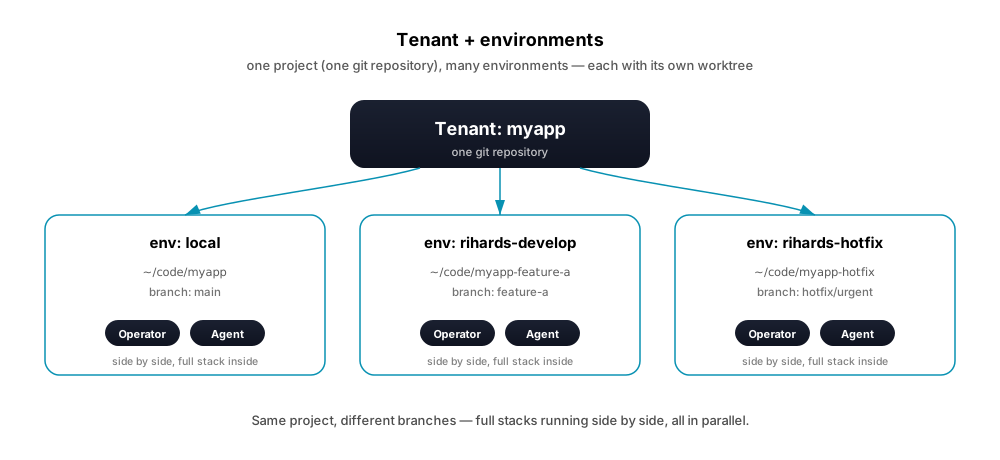
You can run as many envs in parallel on the same machine as your CPU and memory allow.
Common environment names
Teams using ERun typically settle on a small set of shared environments that everyone on the project sees:
| Name | Used for |
|---|---|
local | Default agent environment (runs in agent mode). |
dev | Shared development integration. |
test | User acceptance testing (UAT). |
dr | Disaster recovery. Often doubles as UAT to save resources. |
prod | Production. |
Plus per-operator environments — one set per Operator or Agent working in parallel:
| Name | Used for |
|---|---|
<operator>-develop | The operator's long-running development branch. |
<operator>-hotfix | Urgent fix branch. |
<operator>-review | Review or exploration branch. |
Replace <operator> with the Operator's name (rihards-develop, alice-hotfix, claude-review, …). The pattern scales — add a new Operator, they create their own set; each set is isolated, so no one steps on anyone else's state.
Where configuration lives
Per-user config lives under <config-root>/ (global defaults, per-tenant, per-environment); per-project config sits at <repo>/.erun/config.yaml committed alongside the code. Exact paths per OS: Config locations.
Local tenants and environments vs. a hosted platform's own
The tenant and environments described on this page are local: rows in the config above, on this machine, that every erun command reads and writes directly. A hosted erun platform — the kind erun platform talks to — keeps its own, separate tenant and environment rows in its own database. The two are not linked automatically: creating a tenant or environment here does not create anything there, even when the names match, and vice versa.
If you want a local environment to also be reachable as a hosted one — with its own URL, its own registered lifecycle, deployable from anywhere — you register it on the platform explicitly. See Managing hosted environments for the CLI walkthrough, or open the desktop app's tenant dashboard and switch to its Registration tab, which lists what is already registered on the platform right alongside the local tenant and environments the sidebar shows, so the two are never confused for one another.
Agent mode
Some environments run in agent mode — environments where the Operator and the Agent actively develop, side by side. The mode is about how the env behaves, not about who works there: both Operator and Agent share every agent env equally.
Agent envs are tuned for fast iteration:
- Builds are disposable. Every build gets a unique timestamped tag, so you can build, test, throw away, and rebuild without overwriting anything.
- One-command iterate-and-ship.
erun pushrebuilds and ships in one go. - Auto-picks the right cluster. Defaults to whatever local Kubernetes setup you have (Docker Desktop, OrbStack, Rancher Desktop, kind, k3d) or to the managed cloud cluster you've bound the env to.
By default, the env named local runs in agent mode. Shared envs (dev, test, dr, prod) default to release mode: they receive deploys of artifacts built in agent envs or CI; they don't build themselves. The mode controls build/release behaviour — any env can be flipped to agent mode if your workflow needs it.
Repo source
An agent env can source its repository two ways:
- Host mount. The pod sees your laptop's working directory live (via Kubernetes
hostPath). Edits on your laptop are immediately visible in the pod. Best for agent envs running on a local cluster. - Pod-side checkout. The pod clones the repo onto its own persistent volume. Best for agent envs running on a managed cloud cluster, where the cluster node can't see your laptop's filesystem.
erun init --type local-agent selects the host-mount form; --type remote-agent selects the pod-side checkout. The default is local-agent when neither --type nor --remote is passed.
See Environment types for the full split.