CLI overview
The erun CLI is ERun's automation surface. It's what CI/CD pipelines invoke for build / push / deploy, what runs inside every runtime pod, and what the desktop app shells out to when you click a button. If you're scripting, running on a build runner, or working headlessly, the CLI is your interface.
For day-to-day work on macOS or Windows, use the desktop app — it's the same CLI underneath, with a UI on top.
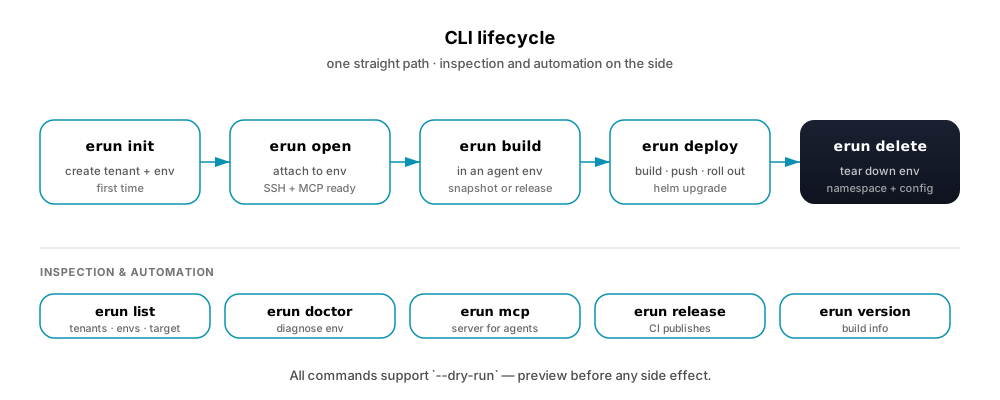
init to delete. The bottom row holds inspection and automation commands you reach for as needed.Every command supports --help. Action-oriented commands also support --dry-run (read-only commands like list and idle don't need it).
The build → release → push → deploy commands form ERun's delivery pipeline. See the Delivery pipeline for how they fit together.
Commands
| Command | What it does |
|---|---|
erun | Universal entry point. In a fresh project, runs init. In a configured one, runs open. |
erun init | Create or update a tenant + environment, bring the environment up. |
erun open | Open a shell into the environment (starts it first if it was stopped). |
erun stop | Stop an environment so its CPU and memory go back to the ones you are using. |
erun delete | Tear down an environment — remote namespace + local config. |
erun build | Build the project's container images (agent envs only — runtime envs receive deploys). |
erun release | Cut a release: stamp the version, publish its images and charts, then tag it. |
erun push | Push built images to the configured container registry. |
erun deploy | Roll a version out to an environment (build · push · helm upgrade). |
erun e2e | Run the project's Playwright suite against a deployed environment, with its resolved URL and version injected. |
erun publish | Mirror a built version's images to the shared registry (from→to), no build or deploy. |
erun expose | Expose an env's Service at a public hostname under the platform's services zone. |
erun cloud | Set up and manage cloud provider aliases (AWS SSO), and refresh an environment's host AWS credentials. |
erun context | Create and power managed cloud contexts (an EC2 instance running k3s). |
erun sshd | Enable SSH (and IDE) access to a remote environment. |
erun list | List tenants, environments, and the effective target. |
erun idle | Show an environment's idle / auto-stop status. |
erun observe | Report an environment's Kubernetes state, read-only — pods, quota/limit usage, ingress + TLS, certificate readiness. |
erun usage | Report an environment's live CPU, memory, and disk usage, read from cgroup v2 — no metrics-server required. |
erun job | Start long work in an environment and observe it by handle — start, status, await, output, cancel. |
erun doctor | Diagnose and repair an environment's runtime and config. |
erun version | Print erun's build version (and the project's, when in one) + latest published versions. |
erun mcp | Run the MCP server for Agents (launches emcp); call / tools / token reach an env's MCP edge. |
erun api | Run the backend API server (launches eapi). |
erun app | Launch the desktop app. |
erun exec | Run repository helpers — diff, raw, write, commit, push, merge. |
erun contribute | Contribute-mode helpers — clone the ERun repo locally. |
Dry-run and verbosity
Every action-oriented command supports --dry-run — resolve and print every step without performing side effects. The trace is byte-for-byte identical to the real-run trace except that values matching common secret patterns (tokens, JWTs, AWS keys, GitHub tokens, kubeconfig user tokens, SSH private keys) are replaced with <redacted…> placeholders, so previews are safe to paste into a PR or chat. For the exact regex set and emit-time semantics, see Agent reference · Dry-run redaction.
-v / --verbose streams external tool output; -vv adds per-command trace lines for every action and decision; --time prints elapsed wall time at the end. Full flag set per command is on the CLI flag spec page.
You never have to re-run a failed command just to capture diagnostics: every environment-scoped command (open, doctor, deploy, a scoped upgrade) automatically appends its full trace to the environment's rolling trace log, readable at any time from the desktop's Diagnostics console — including for runs that finished before you went looking. --dry-run previews are never written to it.
How arguments resolve
Most commands accept [TENANT] [ENVIRONMENT] as positional args. When omitted, ERun resolves them from explicit flags, then the current directory's git repo, then user-level defaults, then prompt. See Configuration · Effective tenant + environment for the full algorithm.