Conventions and folder layout
Why conventions
Conventions are how ERun stays frictionless. The Agent shouldn't have to guess where Dockerfiles live or how the build plan is wired — and you shouldn't have to write that wiring once per project. ERun looks for a small, predictable layout; when it finds it, every command (build, push, deploy, release) just works. Explicit overrides exist, but the more you stay on the path, the less typing — for you and the Agent.
This page is the spec for what ERun looks for, where it looks, and how it behaves when you run commands from different directories.
The expected project layout
Here's the layout the erun repository itself uses. Your project follows the same shape with your project name replacing erun:
erun/                                    # Git repo root. .git lives here.
├── .erun/
│   └── config.yaml                       # Per-project config (committed).
├── VERSION                               # Default version (fallback).
├── build.sh                              # Optional top-level build script.
│
├── erun-devops/                          # The DevOps module (`<tenant>-devops`).
│   │                                       # Owns every Docker build context and every helm chart.
│   ├── VERSION                           # Default version for builds in this module.
│   ├── docker/
│   │   ├── erun-devops/                  # The runtime pod image (extends erun-ubuntu).
│   │   │   └── Dockerfile                #   Ships the shell, the CLI, and the MCP server.
│   │   ├── erun-backend-api/             # Backend API image.
│   │   │   └── Dockerfile
│   │   ├── erun-backend-postgres/        # Postgres image (pinned).
│   │   │   └── VERSION                   # Per-image VERSION override.
│   │   └── erun-dind/                    # Docker-in-Docker sidecar.
│   │       └── VERSION                   # Pinned to docker version (28.1.1-1).
│   └── k8s/
│       ├── erun-devops/                  # Runtime pod chart (the env's own pod).
│       │   ├── Chart.yaml
│       │   └── values.local.yaml
│       ├── erun-backend-api/             # Backend API chart.
│       │   └── Chart.yaml
│       ├── erun-backend-db/              # Migration Job chart.
│       │   └── Chart.yaml
│       └── erun-backend-postgres/        # Postgres chart.
│           └── Chart.yaml
│
├── erun-cli/                             # Source modules. No docker/ or k8s/ of their own.
├── erun-common/                          #   Dockerfiles in erun-devops/docker/*/ COPY from these.
├── erun-mcp/
├── erun-backend/
│   └── erun-backend-api/                 #   Source modules can nest.
└── erun-ui/
Project naming convention
- Tenant name = your project name (the directory holding
.git). Forerunit'serun; forpetiosit would bepetios. - DevOps module =
<tenant>-devops/. Forerunthat'serun-devops/.
The <tenant>-devops/ module is yours to grow — the Agent's skills write into it as you add components. The env's own runtime pod doesn't depend on it: environments without a repo-local runtime chart deploy ERun's published erun-devops chart directly (see erun deploy).
Component naming
A component is a deployable unit — typically a service, a migration job, a cron job. Each component has a single name that's used identically everywhere ERun looks for it.
| Where the component name appears | Path / value |
|---|---|
| Source module | <projectRoot>/<component>/ (top-level) or nested inside another module |
| Docker build context | <projectRoot>/<tenant>-devops/docker/<component>/ |
| Helm chart | <projectRoot>/<tenant>-devops/k8s/<component>/ |
| e2e suite (optional) | <projectRoot>/<tenant>-devops/playwright/<component>/ |
| Deploy plan entry | environments.<env>.k8s.deployments[] in .erun/config.yaml |
| Image tag | <registry>/<component>:<version> |
| Kubernetes resources | Deployment / Service named <component>, pod label app: <component> |
Rules
- Validation. Names must match
^[a-z][a-z0-9-]*$— lowercase ASCII letters, digits, and hyphens; must start with a letter. No underscores, no uppercase. (Same constraint as Kubernetes DNS-1123 labels, which the name lands in.) - kebab-case. Hyphens between words.
backend-api, notbackend_apiorbackendApi. - Descriptive nouns over abbreviations.
migration-jobovermigr.
Tenant prefix (recommended)
Prefix every component with the tenant name. The erun repo itself follows this:
| Tenant | Short role | Full component name |
|---|---|---|
erun | cli | erun-cli |
erun | mcp | erun-mcp |
erun | backend-api | erun-backend-api |
petios | frontend | petios-frontend |
Why prefix:
- No collisions when several tenants publish to the same registry.
- Self-describing in deploy plans,
kubectl get pods, and image tags —petios-apireads as "the api of petios" at a glance. - Coexists with the runtime-pod chart, whose component name is the literal
<tenant>-devops(erun-devops,petios-devops).
The prefix isn't enforced — bare names work — but the convention is strong enough that the language skills (go-service, node-service, …) default to applying it when generating a component from an Operator's short role description. For tiny one-service tutorials the prefix is sometimes elided for brevity; once a project has three or more components, prefix consistently.
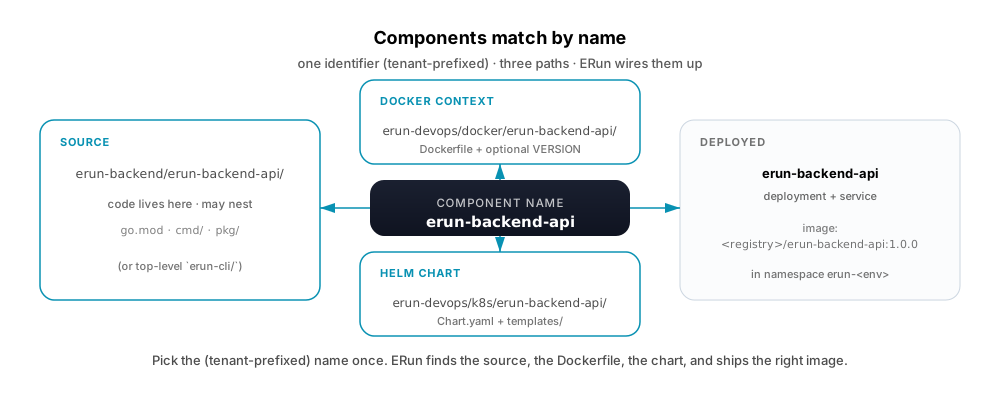
Example: the erun-backend-api component has source at erun-backend/erun-backend-api/, a Dockerfile at erun-devops/docker/erun-backend-api/Dockerfile, and a helm chart at erun-devops/k8s/erun-backend-api/Chart.yaml. ERun matches them up by name.
For the validation regex, the reserved <tenant>-devops name, and the full failure-mode catalogue, see Agent reference · Component naming.
Project root
The project root is the directory containing .git. ERun finds it by walking up from the current working directory. It's the Docker build context for standard-layout builds, the boundary for VERSION-file walks, and the location of .erun/config.yaml.
Multi-stage builder pattern
ERun expects Dockerfiles to use a multi-stage builder pattern — a builder stage that provisions the toolchain and produces an artefact, then a runtime stage that ships only the artefact. Single-stage Dockerfiles aren't rejected, but the cache, image-size, and security benefits don't apply.
The language-specific skills the runtime image ships (go-service, node-service, python-service, java-service, …) teach the Agent the conformant Dockerfile shape for each language. For the pattern's spec (full skeleton, why the pattern, behaviour around COPY paths), see Agent reference · Conventions spec.
Docker build contexts
Each image lives at <tenant>-devops/docker/<component>/Dockerfile. In the standard layout, the Docker context is the project root — so the Dockerfile can COPY from anywhere in the tree.
If a Dockerfile sits somewhere else, ERun degrades to a flat layout (context = Dockerfile's directory). For the exact decision rule and the trade-offs, see Conventions spec · Docker build context resolution.
These default locations — the docker/, k8s/, and playwright/ folders, the terraform-<tenant> folder, and the VERSION file — are overridable per project via the paths: block in .erun/config.yaml, for repos that don't nest them under a <tenant>-devops/ module.
e2e suites
erun e2e discovers a playwright/ folder the same way build discovers docker/: either <tenant>-devops/playwright/playwright.config.ts directly (one suite), or per-component subdirectories (<tenant>-devops/playwright/<component>/playwright.config.ts) mirroring the Docker/Helm layout. It runs the suite once against an already-deployed environment, with the resolved HTTPS URL and the deployed version injected — never declared by the suite itself. A project with no playwright/ folder makes erun e2e a clean no-op. See erun e2e and Delivery pipeline.
VERSION files
ERun walks up from the build directory looking for the first VERSION file — image-specific overrides the devops-module default, which overrides the project default. Contents are just the semver string (e.g., 1.0.76); agent envs append a -snapshot-<timestamp> suffix automatically.
For the exact walking order, see Conventions spec · VERSION file walking order.
Command overrides via <command>.sh
Any erun command can be overridden by a matching shell script in the project. Drop build.sh, push.sh, deploy.sh, or release.sh at the top level and ERun runs it instead of the built-in logic.
This is the escape hatch for flows that don't fit ERun's defaults — a hand-rolled build pipeline, a custom registry login dance, a deploy waiting on an external approval. Use it sparingly: the more logic lives outside ERun, the less the audit trail and --dry-run previews can show.
An environment can also opt out of build.sh discovery: turn on Ignore project build.sh in its Runtime settings (or pass --disable-build-script to erun init) when the project keeps a build.sh for other tooling but you want erun build to build the container images directly.
For the resolution order and the script contract, see Conventions spec · Command override resolution.
Charts and deploy plans
Helm charts live at:
<tenant>-devops/k8s/<component>/Chart.yaml
One chart per deployable component. Components map 1:1 with images by name when a service has both (e.g. erun-backend-api has a Dockerfile at <tenant>-devops/docker/erun-backend-api/ and a chart at <tenant>-devops/k8s/erun-backend-api/).
Writing this layout by hand for a new service is exactly what the erun-blueprint-service skill does — it adds the Dockerfile, chart, and per-env values.<env>.yaml overlays for a component in this shape, so a hand-written or generated service becomes something erun build/erun deploy can find without anyone reverse-engineering the convention above.
The deploy plan — which charts deploy in what order — is declared per env in .erun/config.yaml. Each step is either a single component name (deployed alone) or a list (deployed in parallel within the step); steps run in declared order. Different envs can declare different plans (a slim plan for dev, the full backend for prod). For the YAML schema and the per-field semantics, see Configuration · environments.<env>.k8s.deployments[].
Per-env helm value overlays live next to the chart as values.<env>.yaml — runtime envs need them; agent envs use defaults.
Pods for services, Jobs for one-shots
ERun deploys two kinds of workload through helm charts:
- Pods (Deployments / StatefulSets) for long-running processes — API servers, databases, queues, the runtime pod itself.
- Jobs for one-shot deployment operations targeting external resources — database migrations, CDN uploads, Lambda updates, terraform applies. The Job's container carries the payload, applies it, and exits.
Same erun deploy <component> invocation for either kind; the helm hook annotations on the Job make every deploy spin up a fresh one with a clean audit-trail entry.
For the full Job chart skeleton and the rationale, see Conventions spec · Helm Job pattern for one-shots.
How erun commands resolve scope
build, push, and deploy all use the current working directory to figure out what to act on. The resolution is one rule:
Walk up from the cwd until you find a recognised context. The first match wins.
| Cwd | Resolves to | Effect |
|---|---|---|
<projectRoot>/ | every image / every chart | act on the full DevOps module |
<projectRoot>/<tenant>-devops/ | every image / every chart | same — act on the full module |
<projectRoot>/<tenant>-devops/docker/<image>/ | one image | act on just that image (build / push only) |
<projectRoot>/<tenant>-devops/k8s/<component>/ | one chart | act on just that component (deploy only) |
<projectRoot>/<tenant>-devops/playwright/<component>/ | one suite | act on just that component (erun e2e only) |
| anywhere else | walks up until a context resolves; errors if nothing matches | — |
The env type then determines what each command actually does:
- Agent env (
local-agent/remote-agent) —buildrebuilds with a snapshot tag;pushrebuilds and pushes per-arch + manifest list;deployruns build → push →helm upgrade --installfor the resolved scope. - Runtime env —
buildandpushare errors (see cli/build);deployskips the build/push and runshelm upgrade --installagainst the already-published version.
For the full per-command spec, see erun build, erun push, erun deploy. The hotfix pattern (erun deploy <component> --version 1.2.4 --tenant t --environment prod) is the explicit form of the single-chart row.
The build + deploy model

For agent envs, the version is a snapshot timestamp; the artifact is disposable. For runtime envs, the version is whatever was already published to the registry; the artifact is immutable.
Fingerprint cache
Every Docker build computes a content fingerprint over the Dockerfile and its COPY sources, persisted per-image in .erun/config.yaml. On the next build, if the fingerprint hasn't changed, ERun promotes the image from cache instead of rebuilding — fresh clones pull a few pinned base images instead of rebuilding everything.
An image that stamps the version into what it ships is the exception: its fingerprint includes the version, so a new version rebuilds it rather than re-labelling the previous one. That is what keeps the version a deployed environment reports the same as the version it was deployed at.
For the exact algorithm and the registry/local interaction, see Conventions spec · Fingerprint cache.
The runtime-pod sub-chart
Within <tenant>-devops/, one chart is special: <tenant>-devops/k8s/<tenant>-devops/. This is the runtime-pod chart for the tenant — it deploys the per-environment runtime pod (the erun-devops and erun-dind containers) that gives operators and agents a shell, MCP endpoint, and dind for builds.
It's deployed by erun open automatically. You don't usually deploy it directly, but it's the same shape as any other chart in <tenant>-devops/k8s/*/.
The matching Docker image at <tenant>-devops/docker/<tenant>-devops/ is typically a thin wrapper that extends the shared erun-devops runtime base image with project-specific tools.
What ERun doesn't impose
To be explicit about what's not convention-driven:
- The contents of
build.sh. ERun runs it; what it does is yours. - The contents of helm charts. ERun runs
helm upgrade --install; the chart's templates are yours. - The names of your source modules. ERun doesn't read them.
- The image registry. Default is
ghcr.io/sophium; override per env or per project. - The Kubernetes context. Each env declares its own.
- CI/CD. Plug ERun into whatever pipeline you have.