Delivery pipeline
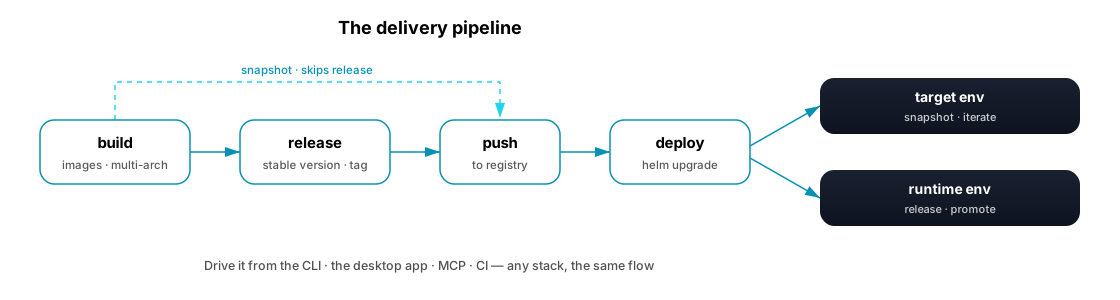
ERun's other half. The environment model gives you a namespace per task; the delivery pipeline gives every one of those environments the same way to ship code: build → release → push → deploy. Whatever the stack — a LAMP app on a VM, a Go service, an autoscaling enterprise system — it ships the same way.
The steps
The four steps are pure primitives — each does exactly one thing, with no environment-type or env-name decision logic inside it. The unit that flows between them is the version: a content identity that build mints and the later steps consume. See Command primitives for the full model.
build— compile the project's container images, multi-arch (linux/amd64+linux/arm64) by default and fingerprint-cached, and mint the version (a snapshot by default;--releasepins a bare semver).buildis the only step that creates a version. A--releasebuild always targets both architectures; a local build may be narrowed to one for an environment whose cluster can only ever run it, andpushignores that narrowing so a published version stays multi-arch (see Multi-architecture).release— orchestrate build → push → git-tag for a stable, immutable version: bump the semver, update the version-bearing files, build, push, commit, and tag. It reusespushfor all publishing. See Versioning.push— publish a version's outputs to the project's container registry: the multi-arch image and the runtime helm chart, together at the same version.deploy— install a published version into an environment with a Helm upgrade, by reference. It never builds or pushes; a version is required.
You rarely run the four by hand. For an Operator at the terminal, convenience shortcuts compose them: erun build --release folds the release flow into the build, erun build --deploy carries one build straight through push and rollout, and erun push --build builds the current source then publishes the version it mints — so one command runs the flow and the version threads through for you. Programmatic callers (the desktop app, scripts, an Agent over MCP) don't use the shortcuts; they run the primitives themselves and thread the version (captured from erun build --output json), keeping the "for this env type, do build→push→deploy" policy in the caller, not the command.
What build does
build turns the source in an agent env into versioned container images — it runs only in an agent env, since a runtime env has no source and only receives already-built artefacts through deploy. It resolves the whole build from the project's conventions; there's nothing per-project to wire up.
How it finds what to build
It discovers each component's Dockerfile under the tenant's devops module — every docker/<component>/ directory is one image, named with the tenant prefix (petios-api, not bare api) — and tags each with the version from the nearest VERSION file.
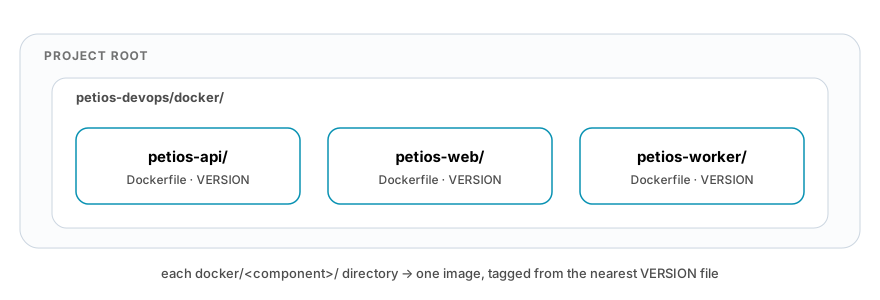
Build order follows the FROM …:${ERUN_VERSION} links between components; component-naming rules and the rest are in Build path resolution and the conventions spec.
The steps
Each component builds for both architectures, reuses unchanged layers from the fingerprint cache, and is tagged with the resolved version.
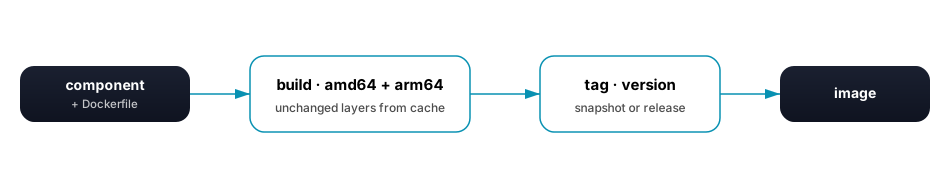
A snapshot version while you iterate; --release pins a stable bare version instead. Either way, the multi-arch manifest list is assembled when the version is published by push. Full contract: multi-architecture build.
How you set it up — and where tests run
Each component's Dockerfile is a multi-stage build: a builder stage that compiles the artefact and runs the tests, then a thin runtime stage that ships only the artefact.

Run every test that doesn't need a deployed artefact (unit tests, and integration tests against in-build fixtures) in the builder stage — because build is docker build, a failing test fails the build and no image is tagged, so a green build is a tested build that marks a review READY. End-to-end tests that need a running deployment run after deploy, via erun e2e below. A test that needs a container runtime of its own (an ephemeral database, say) rather than a deployment belongs in the builder stage too — see Tests that need a container runtime for today's exact status.
See erun build for flags, dry-run output, and error behaviour.
What e2e does
build/push/deploy prove an image builds and installs; they cannot prove the thing it installed actually serves — a stale rollout can look identical to a fresh one from the outside. erun e2e is the step that closes that gap: it discovers a playwright/ folder the same way build discovers docker/, then runs it once against an already-deployed environment with two values injected that the suite never declares itself — the resolved HTTPS base URL and the version the environment is actually running. The suite's first assertion is that the served surface reports that version, so a green run against a stale deployment is no longer indistinguishable from a real pass.
erun e2e refuses before a browser starts, naming the cause, when the environment isn't deployed, the target service isn't exposed, or its certificate isn't issued yet — the three conditions that otherwise surface as an opaque connection timeout or TLS error deep inside a Playwright run. It also refuses a suite that sets ignoreHTTPSErrors or hardcodes its own baseURL, since both would silently defeat the guarantee above. A project with no playwright/ folder makes it a clean no-op.
It is a separate step with its own exit code — erun deploy never runs it as a side effect. erun build --e2e is the everyday shortcut for the branch flow: it composes build → push → deploy → e2e, the same way build --deploy already composes build → push → deploy.
See erun e2e and Conventions spec · Playwright suite discovery.
Two ways to ship
release is for stable, promotable versions — but you don't always need one, and that's the pipeline's range:
- Snapshot — iterate. Skip
release:buildmints a snapshot version,push --version <snapshot>publishes it (image + chart), anddeploy <env> --version <snapshot>rolls it out. Because push publishes the chart for snapshots too, you can deploy a snapshot to a target environment — a shared or remote env, not just your local one. - Release — promote. Run
releaseto cut a tagged, immutable version (build → push → tag), thendeploy <env> --version <release>promotes it to a runtime env.
Same pipeline; the only difference is whether you stop to cut a release.
One flow, any stack
ERun doesn't ship a build system. It supplies the conventions — where a component's Dockerfile lives, how its Helm chart is named, how versions are tagged — so the steps resolve the same way no matter what's in the repo. A new service added to a project inherits the pipeline automatically; there's nothing per-project to wire up. That's why the same erun deploy works for a single container and for a system with a database, a queue, and a fleet of services.
One flow, any driver
The pipeline is the same whether a person or a machine runs it.
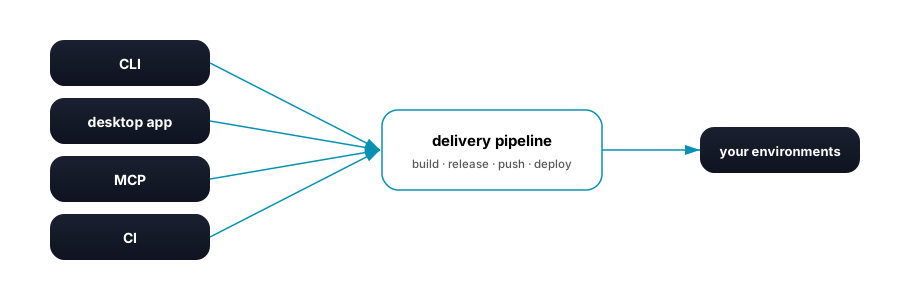
- CLI —
erun build/release/push/deploy, scriptable and headless. See the CLI overview. - Desktop app — the same commands behind buttons. See the desktop app.
- MCP — an Agent calls the
build/push/deploy/releasetools, which run the identical logic and return structured results instead of stdout. - CI — before a review can be accepted, ERun's own merge queue builds the prospective merge of its source onto its current target and gates it with a real
erun build, pushing only on green — the step that catches two reviews that are each green alone but broken together, before the target branch moves. Once a review actually merges this way, it triggerserun releasethrough the release queue, which runs it in an agent env with warm caches, one release at a time per tenant; a latererun deploy --versionrolls the published version out.
Promotion: agent env to runtime env
The fullest shape of the pipeline is promoting a change from where you build it to where it serves. You develop and build in an agent env, iterate by deploying snapshots, then cut a stable version with release and deploy it into a runtime env — which only ever receives already-built artifacts, it never builds. Versioning covers the snapshot-versus-release mechanics; environment types covers why the two kinds of env exist.
Where next
- Versioning — how snapshot and release versions are generated.
erun e2e— post-deploy verification against a real, deployed environment.- CLI overview — every command, grouped by what it's for.
- Build a small app — the pipeline end to end, from a blank directory.
- Environment types — agent envs build; runtime envs receive.