Operator in the loop
ERun environments are shared infrastructure. The remoting surface that lets clients attach is exactly two protocols — SSH (remote shell + filesystem) and MCP (typed tools). Both endpoints live in the same runtime pod, both are port-forwarded to localhost by the desktop, and both see the same workspace. Both accept any client — the labels below are typical usage, not restrictions.
- SSH clients — VS Code (Remote-SSH), IntelliJ IDEA Gateway, Cursor, Zed, JetBrains products (GoLand, PyCharm, WebStorm, …), Neovim with remote plugins. The Claude Code and Codex desktop apps also attach over SSH — they open the env as a remote workspace exactly like an IDE.
- MCP clients — Codex, Claude Code, custom agents — anything that speaks JSON-RPC 2.0 against the env's MCP endpoint.
The same Agent often uses both: SSH for file edits and shell commands, MCP for structured ERun operations (idle, list, doctor, build, …).
Together they form one client surface: an IDE talking to the SSH endpoint and an Agent talking to the MCP endpoint see the same /home/erun/git/<repo>, the same docker daemon, and the same audit trail. There is no second-class client. An Operator in VS Code and Claude Code in the same env are not in parallel universes — they are looking at the exact same workspace in real time.
Within that shared infrastructure, the operator — the human responsible for the work — owns control. Agents are powerful, but the Operator decides when they run, sees what they do, can join the environment, take over, hand back, or work alone. Every action either side takes is captured in an audit trail the Operator can replay.
The operator is not just a supervisor. They can also be the primary developer in an environment — opening it in any IDE and writing code themselves, with no agent in the loop at all. ERun is a great agentic platform; it is equally a great clean dev environment for humans alone. Both modes are first-class, and the Operator decides which one applies on any given task.
When Agents are involved, the Operator-control and audit infrastructure is what makes it safe to extend their autonomy over time. You can't trust an Agent with more responsibility than you can observe.
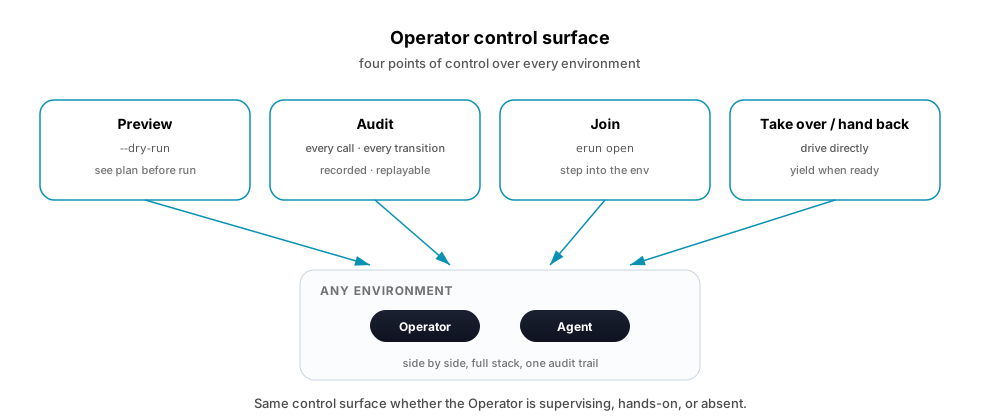
What "first-class operator" means in practice
| Capability | How ERun delivers it |
|---|---|
| Join an Agent's environment | erun open <tenant> <env> attaches a real shell to the same runtime pod the Agent is using. The operator and the Agent share /home/erun, the docker daemon, and the workspace. |
| See live activity | The desktop app's terminal sessions show what's happening in real time. The MCP server's idle and list tools return current state. |
| Audit every agent action | Every CLI command runs through auditCommand and emits a trace line. --dry-run shows the Operator the same plan ahead of time — preview, then approve. Every API write (review status change, comment, build) is persisted with the actor's identity. |
| Review and revert | All changes flow through git. Comments and reviews in the erun API are append-only with status transitions. Build outcomes are recorded, not transient. |
| Take over an in-flight task | The operator opens the Agent's environment, suspends the Agent (or lets it finish its current step), continues in the shell, then hands back. |
| Delegate selectively | The operator can scope what the Agent is allowed to do via tenant-level permissions and OIDC issuer trust — the same controls a human collaborator would have. |
The audit trail
Three layers of audit, all readable by the Operator:
- In-environment trace — every
eruninvocation emits aaudit: erun <cmd> <args>line and per-action trace lines (e.g. the exactdocker build,helm upgrade,git pushcommands it ran). The same lines appear in--dry-runmode so the Operator can preview a command before running it; the dry-run trace and the real-run trace match. - Per-environment MCP —
idle.activityrecords terminal activity and network traffic windows.doctorrecords inspection outcomes.rawrecords the exactargvrun and the working directory. - Hosted erun API — every review, comment, status transition, and recorded build is persisted with
creator_user_idand timestamps. An audit-events table captures security-relevant events. Nothing an Agent does via the API is anonymous; nothing is unrecoverable.
For a security-sensitive action — a release tag push, a merge-queue advance, a status transition — the Operator can reconstruct who did what, when, in which environment, and with which build.
The event format, retention windows, and the catalogue of captured security events are the Agent's spec — see Agent reference · Audit log format.
How to attach
The operator's entry point is always erun open. Pick the attach mode that fits the task — every mode operates on the same runtime pod, sees the same workspace, and shares the same audit trail.
erun open my-tenant feature-a              # shell
erun open my-tenant feature-a --vscode     # VS Code Remote-SSH
erun open my-tenant feature-a --intellij   # IntelliJ Gateway
For Cursor, Zed, JetBrains Gateway, Neovim's remote plugins, or any other editor that speaks SSH, point it at the local SSH port the desktop holds open. The --vscode and --intellij flags are convenience launchers; the underlying SSH endpoint is the universal contract.
Agents (Codex, Claude Code, others) attach to the same environment over MCP — see Desktop app · Working with an Agent for how the desktop publishes the endpoint.
With or without an Agent
These attach modes are not specific to supervising Agents. The operator can use them for entirely human-driven work — erun open my-tenant scratch --vscode to explore a problem, erun open my-tenant feature-b as a clean dev environment for code you're writing yourself, many environments in parallel without an Agent anywhere in the picture. The platform doesn't care whether an Agent is present; the same isolation, audit, and tooling apply.
Delegating to the Agent
The operator decides what work to hand off. Common patterns:
- Scoped task: open a review with a clear name and target branch (
POST /v1/reviews). The agent picks it up, opens the matching environment, iterates, records builds, and signalsREADY. - Constrained autonomy: the Operator pre-approves a class of changes (e.g. dependency bumps, generated-code regeneration) via tenant policy. The agent can act without per-action approval inside that scope.
- Pair-style review: the Agent does the work, opens a review with comments explaining decisions. The operator reviews, leaves counter-comments, the Agent addresses them. Same shape as two engineers collaborating.
The path to eventual autonomy
The structure ERun puts in place — operator-in-the-loop today, with full audit and the ability to join any agent's environment — is what makes eventual autonomy safe. Trust is built on three observations:
- Past and future behavior are both visible.
--dry-runanswers "what would this agent do?"; the persistent action log answers "what did this agent do?" — at the same fidelity. The operator never has to take an Agent's word for either. - Scope is enforceable. OIDC, tenant scoping, and the per-environment isolation model put real walls around what an Agent can touch.
- Take-over is cheap. If an Agent goes off-course, the Operator joins the environment in one command. There's no "agent runaway" because there's no place an Agent can run where an Operator can't follow.
As these guarantees hold for more classes of work, Operators can extend the Agent's autonomy — graduating from per-action approval to per-task delegation to per-class autonomy — without ever blinding themselves to what's happening. ERun's job is to make sure the audit and control infrastructure scales ahead of the autonomy, not behind it.
Where to look in the platform
- The CLI's
audit:trace and per-command--dry-run(every command). - The MCP
idle.activityanddoctortools (every environment). - The erun API's review history, comment threads, and build records (every tenant).
- The desktop app's per-environment terminal sessions (live view + replayable scrollback).
Together, these form the Operator's control surface. They are not optional — they are how ERun works by default.