Workflow
How Operators and Agents work together evolves through three levels of maturity, but the first principles stay the same at every level. This page covers both: where you are on the maturity progression, and what stays constant about how work flows through ERun-managed environments.
Three levels of Operator-Agent collaboration
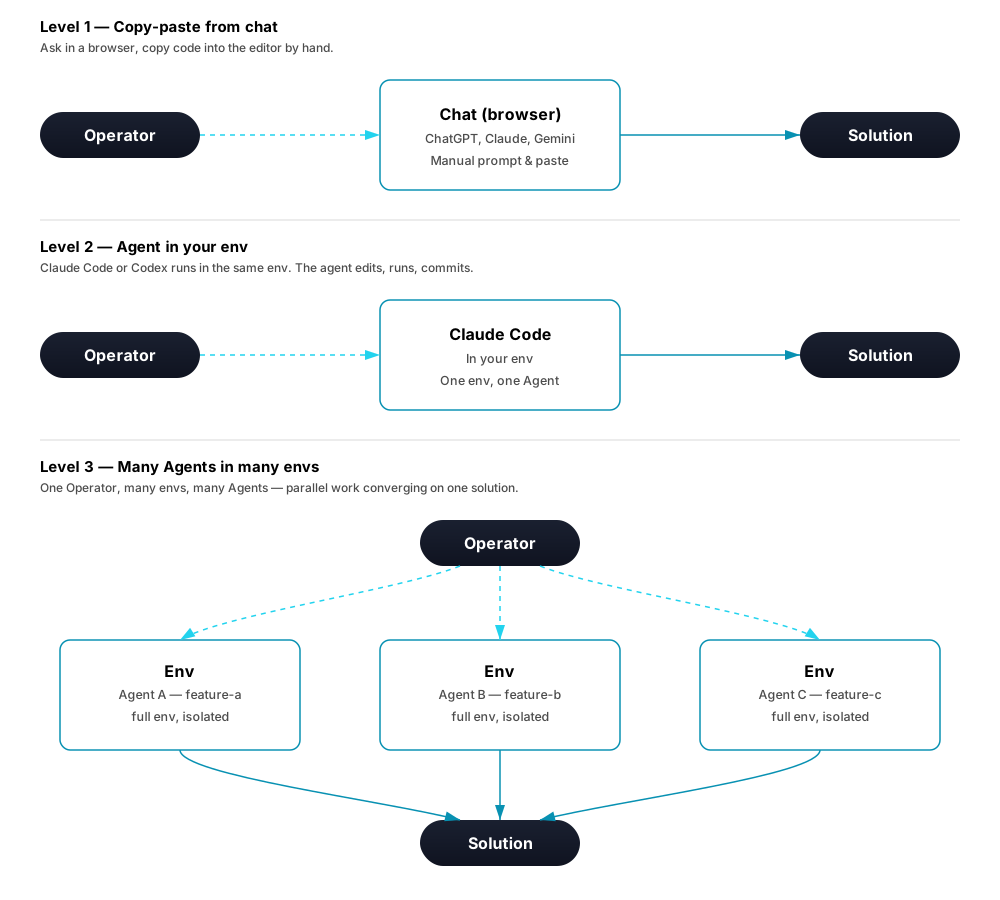
Level 1 — Copy-paste from chat
The starting point. The Operator opens a chat tool in a browser, describes a task, gets code back, copies it into their editor. Low setup; anyone can do it on day one. The Agent has no view into the project beyond what the Operator pasted in; every iteration is a manual round-trip; nothing runs against a real system.
Level 2 — Agent in your env
The Agent (Claude Code, Codex, …) runs inside the same environment as the Operator — same files, same shell, same build tools. Diffs land in the workspace directly; the Agent can ls, cat, git diff actual project state. Limitation: one env per Agent. Two Agents step on each other's files. Integration tests still mean tearing down what you were doing.
Level 3 — Many Agents in many environments
The Operator orchestrates multiple Agents, each in its own ERun environment. Every Agent gets a full Kubernetes namespace with backend, database, queues, everything the feature needs to run end-to-end. Parallel work without crosstalk; integration tests on every build; one Operator running team-scale throughput (within Brooks's Law).
Level 3 is where ERun's per-env isolation, per-Agent identity, and audit trail pay off. The rest of this page assumes you're heading there — the workflow primitives below are what scale into many Agents working in parallel.
At this level the desktop app lets you run an orchestrator: a host-side AI session that is not scoped to one environment. It links a set of your agent environments — local-agent, remote-agent, and host alike — drives each pod-backed one through that env's MCP (delegating the actual edits to the Agent in its pod), reviews each one's code in a host directory, and runs host-native build artifacts the Linux pod cannot execute itself. A host env is the exception on both counts: it has no pod and no MCP edge, so the orchestrator works its directory directly.
Where that review directory lives follows the environment's type, and you don't choose it per orchestrator:
| Environment type | Review directory | How it gets there |
|---|---|---|
remote-agent | A mirror under your home orchestrators/ folder, one per env | Linking the env turns on its one-way workspace sync, which fills the mirror from the pod. You can place the mirror anywhere. |
local-agent | The env's own repository path | Nothing to set up — the pod already hostPath-mounts that directory, so the orchestrator reads the same worktree the Agent builds from. The path is derived from the environment, so change it in Manage, not in the orchestrator. |
host | The env's own directory | Nothing to set up and nothing to sync — the directory is already on this machine and no pod owns it. It is the one kind the orchestrator works in directly rather than reviewing read-only, because there is no in-pod Agent to delegate the edits to. |
An orchestrator never writes into a pod-backed review directory: the Agent in the pod owns the worktree, and the orchestrator delegates, reviews, and verifies. For a local-agent env that rule matters more, not less — an edit there really would reach the pod, and land in the middle of the Agent's work. A host env is the one exception, and for the opposite reason: nothing else owns that directory, so there the orchestrator authors and builds itself.
An orchestrator also does not stop to ask you. Its contract is to resolve ambiguity from the code, tests and sensible defaults and carry the task to a verified end, so a question is a defect rather than caution — one asked while you are away stalls the work until you come back. That is enforced, not merely instructed: the session is launched without the harness's question tool, and a turn that tries to end by handing you a decision anyway ("say the word and I will…") is refused and told to decide. An irreversible or cross-environment action still gets a heads-up, but it arrives as a notification while the orchestrator proceeds, never as a prompt waiting on you.
The desktop also keeps that contract in front of a session that has gone quiet, and brings one back if it dies outright:
- Pacing. If a running orchestrator's session hasn't reported any activity for about ten minutes, the desktop types the pacing reminder straight into its pane — the same "keep going, don't stop to ask, wait out a connection error and resume" contract, plus a line telling it to say so and stop if the task is genuinely done. You'll see it as a dim marker line, so it's never a silent, invisible poke. A session that keeps going dark gets nudged again every ten minutes, up to six times over about an hour; past that the desktop stops and tells you, since nudging a session that never answers isn't recovery. Typing into the pane yourself, or the session reporting real activity again, resets the count.
- Auto-resume after a crash. If the session's process dies outright rather than ending cleanly, the desktop relaunches it into the exact same conversation and tells it to pick back up where it left off — you don't have to notice and restart it yourself. This never happens for a session you stopped or quit yourself: your Stop is never second-guessed.
First principles
Every workflow on ERun shares the same shape, regardless of which level you're at:
- Each work item has an Operator — the human responsible for it.
- Work happens in an isolated environment — driven by Operator alone, Agent alone, or both side by side.
- The Agent's autonomy depends on its maturity for that class of work — Supervised or Autonomous-in-scope (see below).
- Every action is auditable — Operators preview before (
--dry-run), replay after (audit log).
State names, board columns, issue trackers — incidental. The primitives stay constant.
States the team uses
ERun isn't tied to a specific workflow tool or a fixed set of states. It slots under whatever your team already uses — Jira, GitHub Issues, Linear, Kanban, custom flows. Use ERun with your existing process; don't rewrite your process to use ERun.

| State | Meaning |
|---|---|
| TRIAGE | Idea or issue exists. Not committed to yet. |
| TODO | Accepted into the backlog, ready to pick up. |
| IN PROGRESS | Assigned. Work happening in an environment. |
| PR | Review opened — see reviews. |
| QA | Build green, final validation. |
| DONE | Merged via the queue. |
| REJECTED | Abandoned at any stage. |
PR / QA / DONE map cleanly to the ERun review lifecycle (OPEN → READY → MERGE → MERGED). TRIAGE / TODO / IN PROGRESS sit above ERun as project-management states the team owns. Rename any of them; ERun's behaviour doesn't change underneath. READY becomes MERGE and then MERGED through the merge queue, never by a caller asserting either status directly.
What flows through — Stories, Epics, Tasks
The unit ERun's workflow tracks is the Story. Stories group into Epics (longer-term goals) and break into Tasks (parallel sub-activities inside a Story).
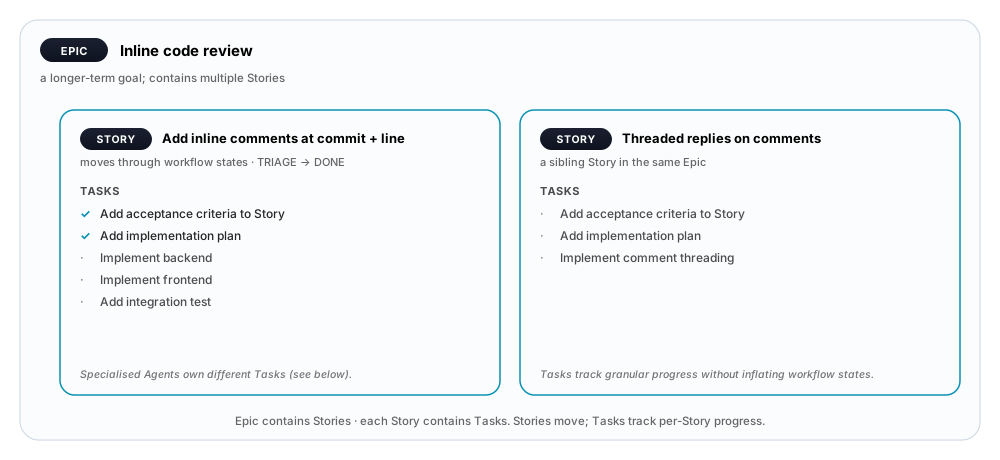
| Unit | What it is | Lifetime | Examples |
|---|---|---|---|
| Epic | A longer-term goal containing multiple Stories. Often a customer-visible feature or a quarter's theme. | Weeks to months. | "Inline code review", "Multi-tenant auth", "Migration to Postgres 16" |
| Story | The unit that moves through the workflow states. Has acceptance criteria, an implementation plan, and a set of Tasks. | Days to a week or two. | "Add inline comments at commit + line" |
| Task | A sub-activity inside a Story. Parallel-safe. Tracks granular per-Story progress without inflating the main state machine. | Hours. | "Add acceptance criteria to Story X", "Implement backend", "Add integration test" |
The shape is intentional: the workflow stays at 5–7 states, while Tasks carry per-Story granularity. The team's state machine doesn't grow as Agents take on more of the work.
Recommended Story format
Title:        <short verb phrase — what gets done>

Description:  As a <persona>, I want <capability>, so that <benefit>.

Acceptance
criteria:     - <given / when / then, or a checklist bullet>
              - ...

Implementation
plan:         (added once acceptance criteria are agreed)
              - <step>
              - ...

Tasks:        [✓] Add acceptance criteria to Story
              [✓] Add implementation plan
              [ ] Implement backend
              [ ] Implement frontend
              [ ] Add integration test
Acceptance criteria use Given-When-Then for testable conditions, or simple bullets for less-formal teams. The Implementation plan is added once acceptance criteria are settled. Tasks track per-step progress — and are the surface specialised Agents collaborate over.
Specialised Agents collaborating via Tasks
Tasks separating a Story into smaller activities is what lets different types of Agents own a slice of the Story lifecycle without coordinating directly. Each Agent watches for a specific Task to exist (or not), and creates / completes / posts to it.
The Build Agent and Review Agent rows below are an abstract sketch of a pattern erun ships concretely as two reusable agents, erun-builder and erun-reviewer, each in its own environment — see Review loop topology.
| Agent type | Watches for | Does |
|---|---|---|
| Requirements Agent | A new customer requirements doc, change request, or ticket. | Reads the input; creates Epics. For each Epic, creates Stories with title + description. |
| Validation Agent | A Story without a Task Add acceptance criteria to Story <title>. | Creates the Task. Reads the Story description. Drafts acceptance criteria. Posts them as the Task's deliverable; marks the Task done. |
| Implementation-plan Agent | A Story with acceptance criteria + no Task Add implementation plan for Story <title>. | Creates the Task. Reads description + acceptance criteria. Drafts an implementation plan. Posts it; marks the Task done. |
| Build Agent | A Story with acceptance criteria + implementation plan, status IN PROGRESS. | Spins up an env, implements per the plan, runs integration tests against the acceptance criteria, opens the PR. |
| Review Agent | An open PR. | Reviews against acceptance criteria + house style. Leaves inline comments or approves. |
None of these need to coordinate directly. Each Agent watches for the absence of a specific Task and creates it; the next Agent in the chain watches for that Task being done. The team's workflow stays at 5–7 states; the inter-Agent choreography lives entirely inside Tasks.
This is what "Agents collaborate without overcomplicating the workflow" means: per-Agent specialisation, granular progress tracking, and a workflow your team can still hold in their heads.
Who does what
| Stage | Operator | Agent |
|---|---|---|
| Triage | Accept / reject | Suggest (Requirements Agent creates Epics + Stories) |
| Backlog | Assign | Pick up (Validation + Implementation-plan Agents enrich the Story) |
| Work in progress | Join, take over, hand back | Build Agent works in env, posts Task updates |
| Review (PR) | Comment, approve, request changes | Review Agent comments; Build Agent responds, pushes fixes |
| QA | Approve merge, reject | Run validation, post results |
| Done / Rejected | Final authority | — |
State labels change. The Operator-Agent split doesn't.
Agent maturity stages (per class of work)
Per class of work, how much autonomy an Agent has earned:
- Supervised — the Agent runs the task end-to-end in its environment. The Operator reviews the resulting PR, not every command. Common steady state.
- Autonomous (in scope) — for pre-approved classes (dependency bumps, doc updates, generated-code regen, snapshot deploys, …), the Agent goes start-to-finish without per-task approval. The audit captures every action; the Operator can review any of it later.
Operators graduate an Agent from one stage to the next by observing past behaviour in the audit log. Scope and graduation are recorded in tenant policy, not in any individual interaction — so trust is durable, not session-bound.
The state machine the team uses is orthogonal to this: an Agent at Supervised maturity can act inside IN PROGRESS of any workflow, whether the team calls that state "Doing", "Active", "In flight", or anything else.
See also
- Agent collaboration overview — the erun API that backs reviews, comments, builds, and the merge queue.
- Merge queue — how a
READYreview becomesMERGED, from every client, plus recovering a wedged gate. - Operator in the loop — what the Operator's control surfaces look like over a Level-3 fleet.
- Reviews, Comments, Builds — the API resources the workflow operates over.