Create your first environment
The recommended path depends on your OS. Either way, you end up at the same place — IDE + Agent attached to a Kubernetes env you can build against.
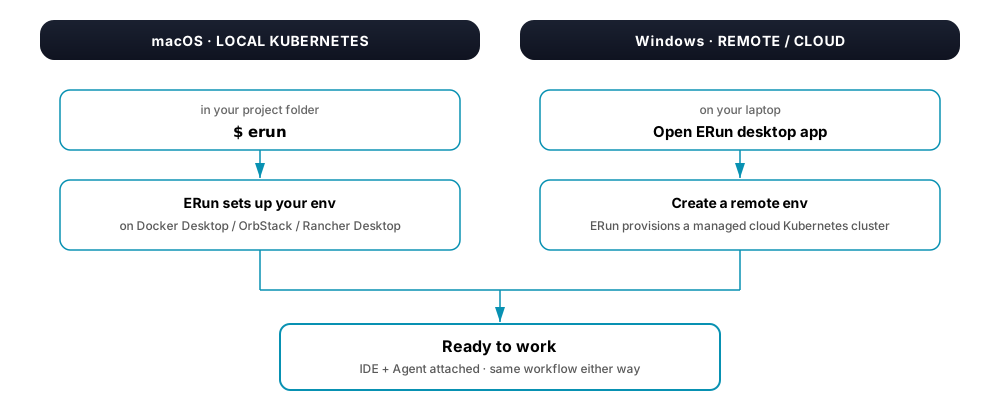
On macOS, type erun in your project folder. ERun walks you through a short setup the first time and reuses it after. The default env runs against the Kubernetes you've enabled in Docker Desktop / OrbStack / Rancher Desktop.
On Windows, open the ERun desktop app and create a remote env. ERun provisions a managed cloud Kubernetes cluster; your IDE and the in-pod Agent attach over the desktop's port-forwards. (Local Kubernetes on Windows runs through WSL2 / Hyper-V / Docker Desktop bind mounts — friction the remote-env path skips entirely.)
Work in it
Once the env is ready, you can:
- Open it in your IDE. Click the env in the desktop sidebar and pick VS Code or IntelliJ; any SSH-aware editor (Cursor, Zed, JetBrains products, Neovim) attaches too. From the CLI:
erun open --vscodeor--intellij. - Work with the Agent. Claude Code, Codex, or your configured Agent is already in the env — the desktop's AI panel surfaces it; a terminal inside the env can launch it directly.
- Type in the env's terminal. The desktop publishes one per env.
Operator and Agent are in the same env, looking at the same files in real time. You can take over, hand back, or work alongside the Agent at any time.
Open as many environments in parallel as your machine can host. ERun handles the details — see Inside an environment if you ever want to look under the hood, but you don't need to.
Where next
- Three scenarios — peer review, hotfix, CI wait — solved.
- Tenants and environments — concepts in depth.
- Environment types — local-agent, remote-agent, runtime.
- Cheatsheet — common commands.