Build a small app with ERun
End-to-end walkthrough — from an empty directory to a running service in your env, in roughly ten minutes.
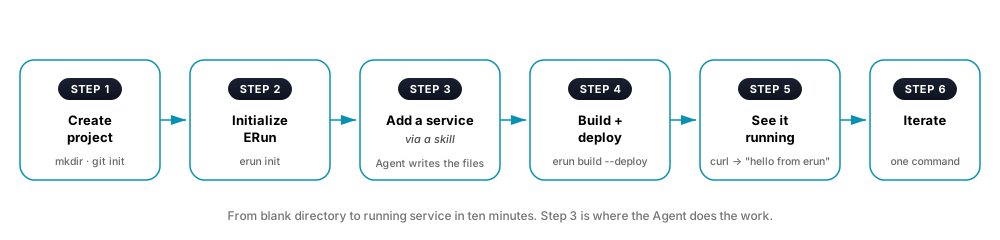
The whole point of ERun's conventions is that you don't hand-write Dockerfiles, helm charts, or deploy plans by trial and error. ERun ships skills — guidance bundles that teach the Agent how to lay out a service, write a conformant Dockerfile, structure the helm chart, and wire the deploy plan. You describe the component; the Agent reads the matching skill and writes the pieces idiomatic for your project.
Prerequisites
- ERun installed (see Install).
giton yourPATH. ERun resolves the project root by walking up to find a.gitdirectory; the first step of this tutorial runsgit init.- Kubernetes enabled in your Docker tool (Docker Desktop, OrbStack, …) or a cloud context already wired up.
- An Agent (optional). The runtime pod ships the
EnvConfig.aitoolCLI (claude,codex, …) pre-wired against in-pod MCP —erun openbrings it up alongside the env. Working without an Agent is fine; the same skills are exposed as CLI subcommands.
1. Create the project
mkdir hello-erun && cd hello-erun
git init
echo '1.0.0' > VERSION
2. Initialize ERun
erun init hello-erun local --set-default-tenant
This creates the per-user / per-project config and deploys the env's runtime straight from ERun's published chart and image — nothing extra is generated into your project. Your project's own Dockerfiles, charts, and deploy plan live in the conventional hello-erun-devops/ module, which the Agent writes for you in the next step.
3. Add a service — via a skill
Ask the Agent:
Add a Go HTTP service called
apithat returns "hello from erun" onGET /.
The Agent loads the go-service skill (deployed automatically when you opened the env) and reads its SKILL.md — the layout, the multi-stage Dockerfile pattern, the helm chart structure, the deploy-plan rule, and the component-naming convention. It picks the full component name (hello-erun-api — tenant prefix + the role you described) and writes the source + Dockerfile + chart by hand, adapted to what you described (HTTP, the route, the stub return value):
hello-erun/
├── hello-erun-api/                          ← new source module
│   ├── go.mod
│   └── cmd/hello-erun-api/main.go           ← stub returns "hello from erun"
└── hello-erun-devops/
    ├── docker/hello-erun-api/               ← new Docker context
    │   └── Dockerfile                        ← multi-stage Go pattern from the skill
    └── k8s/hello-erun-api/                   ← new helm chart
        ├── Chart.yaml
        └── templates/
            ├── deployment.yaml
            └── service.yaml
The same name (hello-erun-api) is used in all three places — that's the component-matching rule, enforced by the skill. The Agent also appends hello-erun-api to the deploy plan in .erun/config.yaml. Everything's hand-written by the Agent following the skill's guidance — no code generator. You see the diff in your editor and approve before it lands.
If your project has its own preferences (a specific HTTP framework, a house style, a custom audit annotation, an exception to the tenant-prefix rule), drop a project skill under <repo>/.erun/skills/go-service/ to layer your guidance on top of the built-in — the Agent picks up both on the next env open. See Skills spec for the format.
4. Build + deploy
erun build --deploy
ERun builds api per the generated Dockerfile, tags it with a snapshot version, pushes to the registry, then helm upgrade --installs the chart. The dry-run trace shows every step:
audit: erun build --deploy
trace:   resolved env type = local-agent (snapshot tags)
trace:   building <registry>/hello-erun-api:1.0.0-snapshot-<timestamp>
trace:   pushing per-arch tags
trace:   helm upgrade --install hello-erun-api hello-erun-devops/k8s/hello-erun-api/
result: ok
5. See it running
kubectl get pods -n hello-erun-local
# NAME                          READY   STATUS    RESTARTS   AGE
# hello-erun-api-79f5b9c64      1/1     Running   0          15s
# hello-erun-devops-7c8b6d8     3/3     Running   0          2m

kubectl port-forward -n hello-erun-local svc/hello-erun-api 8080:8080
# Another shell:
curl http://localhost:8080
# → hello from erun
Or use the Ingress pattern so the service has a stable URL.
6. Iterate
Change the message. One command rolls the new build out:
erun build --deploy
The conventional pieces don't need to change — only the source. Subsequent edits to the Dockerfile or chart are rare; when you do need them, edit them by hand. The skill stays available; ask the Agent to re-read it when you're unsure about the convention.
Built-in skills
ERun ships skills for the common patterns: go-service, node-service, python-service, java-service, static-site, migration-job, cron-job, add-ingress. Each is deployed automatically into the env and discoverable by the Agent's skill loader. Each one follows Conventions. The full catalogue + the SKILL.md format + the project-layering rules live on Skills spec.
What you just did
In ten minutes you:
- Initialized an ERun-aware project from a blank directory.
- Asked the Agent to add a service. ERun's
go-serviceskill taught the Agent the layout, the Dockerfile pattern, and the chart structure; the Agent wrote the source + Dockerfile + chart + deploy-plan entry by hand from that guidance. - Built and deployed the service into a real Kubernetes namespace.
- Iterated end-to-end with one command.
You didn't write a Dockerfile. You didn't write a helm chart. You didn't write a deploy plan. ERun's job is to make the conventional pieces conventional — so you spend your time on what's actually different about your service.
Where next
- Conventions — what the templates conform to.
- Three scenarios — apply the same flow to peer review, hotfix, CI wait.